GoCards includes built-in syntax highlighting for code blocks on your flashcards using Highlight.js, making it perfect for learning programming languages, algorithms, APIs, and technical concepts.
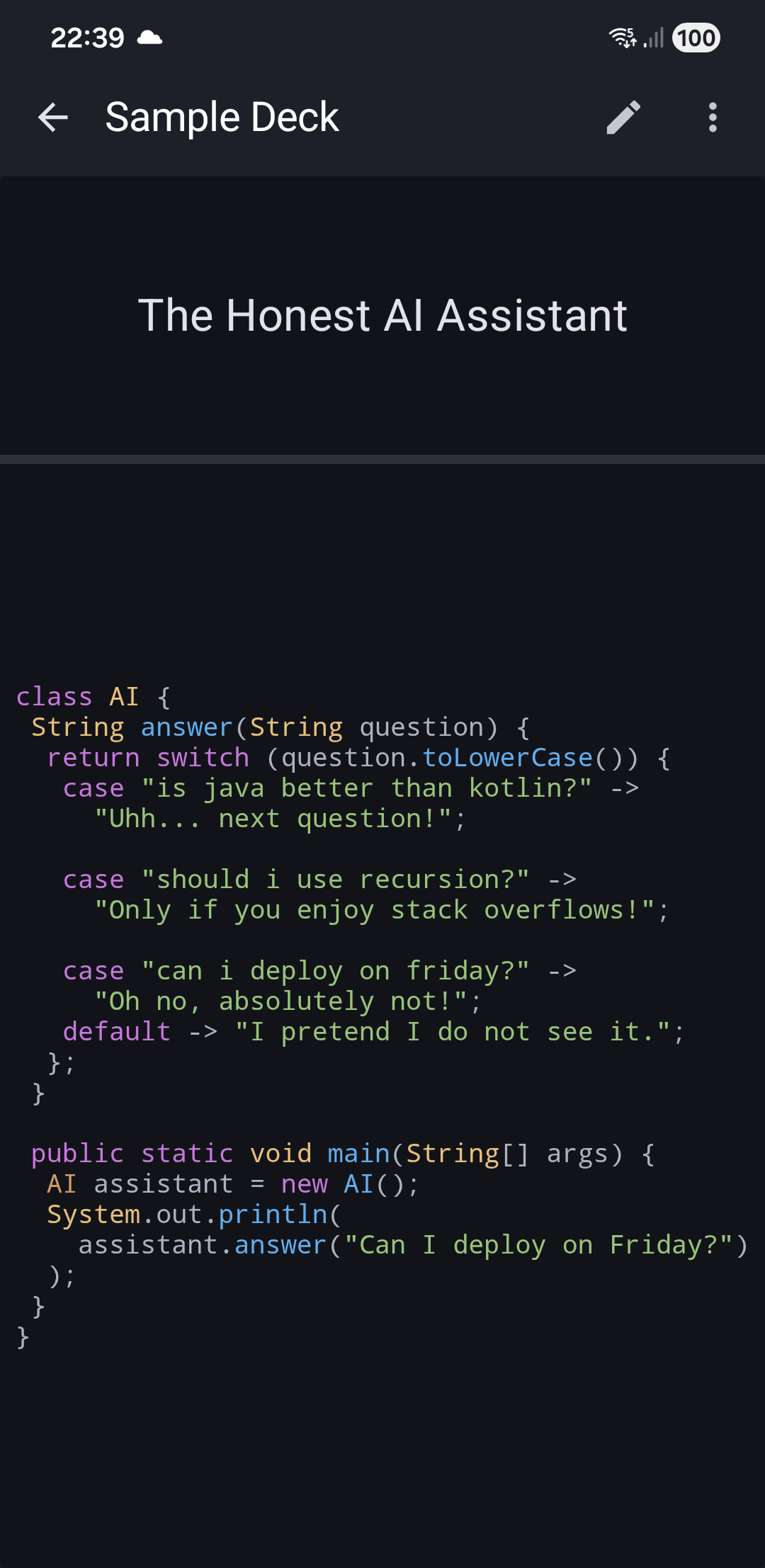
How to Add Code to Cards
To display syntax-highlighted code on your flashcard, wrap your code in <pre><code> HTML tags:
<pre><code>function isPrime(n) {
  if (n <= 1) return false;
  for (let i = 2; i * i <= n; i++) {
    if (n % i === 0) return false;
  }
  return true;
}</code></pre>
Important: Use both tags together: <pre><code> at the start and </code></pre> at the end. This ensures proper formatting and syntax highlighting.
Automatic Language Detection
GoCards automatically detects which programming language you're using - no language specification needed!
About Highlight.js
The app uses Highlight.js 11.9.0, the Internet's favorite JavaScript syntax highlighter. Highlight.js is a powerful, zero-dependency library trusted by major platforms like Stack Overflow and Discord.
Key Features:
- 192 programming languages supported with automatic detection
- No configuration required - works with standard
<pre><code>HTML tags - Smart language detection - analyzes code structure to identify the language
- Compatible with any framework - pure JavaScript with no dependencies
- Optimized performance - only loads when code blocks are present
Supported Languages
Highlight.js recognizes 192 programming languages including:
- Popular languages: JavaScript, Python, Java, Kotlin, C++, C#, Go, Rust, Ruby, PHP, Swift, TypeScript
- Web technologies: HTML, CSS, XML, JSON, YAML
- Scripts & shells: Bash, PowerShell, Shell
- Databases: SQL, PostgreSQL, MySQL
- And many more...
The syntax highlighter analyzes your code's structure and automatically applies the appropriate color scheme.
Theme Support
Code highlighting adapts to your app's theme:
| Theme | Description |
|---|---|
| Light Mode | Light gray background with dark syntax colors (default theme) |
| Dark Mode | Dark background (#282c34) with light syntax colors (Atom One Dark theme) |
The theme switches automatically based on your device's dark mode setting or app theme preference.
Example Usage
Simple Function
Term: How to check if a number is prime?
Definition:
<pre><code>function isPrime(n) {
  if (n <= 1) return false;
  for (let i = 2; i * i <= n; i++) {
    if (n % i === 0) return false;
  }
  return true;
}</code></pre>
Class Definition
Term: Basic Python class structure
Definition:
<pre><code>class Student:
    def __init__(self, name, grade):
        self.name = name
        self.grade = grade

    def display_info(self):
        print(f"{self.name}: {self.grade}")</code></pre>
SQL Query
Term: Select users who registered last month
Definition:
<pre><code>SELECT * FROM users
WHERE registration_date >= DATE_SUB(NOW(), INTERVAL 1 MONTH)
ORDER BY registration_date DESC;</code></pre>
Tips for Code Flashcards
- Keep it focused - One concept or function per card works best
- Include context - Add a brief explanation before or after the code
- Use line breaks - The code block preserves all your formatting and indentation
- Test first - Create a test card to see how your code looks before adding many cards
- Mix with text - You can combine code blocks with regular text using other HTML tags
Combining Code with Other HTML
You can use code blocks alongside other HTML formatting:
The <b>bubble sort</b> algorithm works like this:

<pre><code>function bubbleSort(arr) {
  for (let i = 0; i < arr.length; i++) {
    for (let j = 0; j < arr.length - i - 1; j++) {
      if (arr[j] > arr[j + 1]) {
        [arr[j], arr[j + 1]] = [arr[j + 1], arr[j]];
      }
    }
  }
  return arr;
}</code></pre>

Time complexity: <i>O(n²)</i>
Technical Details
- Syntax Highlighter: Highlight.js 11.9.0
- Languages supported: 192 languages with automatic detection
- Automatic detection: No need to specify the language - Highlight.js analyzes code structure
- Dependencies: Zero external dependencies
- Security: Code content is automatically sanitized to prevent HTML injection
- Performance: Highlighting only loads when
<code>tags are detected on the card - Themes: 512 available color schemes (GoCards uses default and Atom One Dark)
Learn more about Highlight.js at highlightjs.org.
Related Topics
- HTML Tags - Format cards with bold, images, lists, and more
- Adding Cards - Create new flashcards
- Editing Cards - Modify your flashcard content
- Sync Cards - Edit code in Excel/CSV and sync back (Premium)